
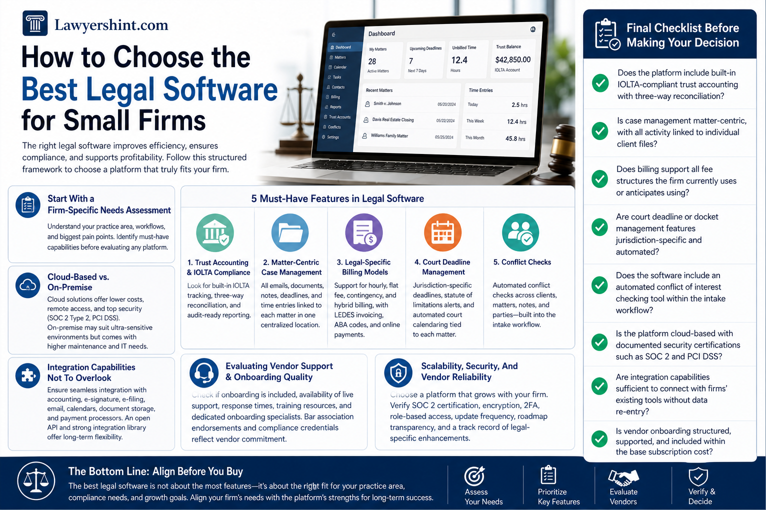

Small law firms operate under a distinct set of pressures. Managing caseloads, meeting court deadlines, maintaining billing compliance, and delivering consistent client service demands operational precision that manual systems usually struggle to sustain. Investing in legal practice management software is no longer a matter of preference; it is a practical investment for firms seeking better efficiency, compliance support, and profitability.
- Start With a Firm-Specific Needs Assessment
- Five Features to Look Out for in Legal Software for Small Firms
- Cloud-Based vs. On-Premise: What Works for Small Firms
- Integration Capabilities Not To Overlook
- Evaluating Vendor Support & Onboarding Quality
- Scalability, Security, And Vendor Reliability
- Final Checklist Before Making Your Decision
- The Bottom Line: Align Before You Buy
This guide provides a structured framework for evaluating and selecting the best legal software for small firms, grounded in what leading platforms officially offer, what to prioritize, and what to scrutinize before committing.
Start With a Firm-Specific Needs Assessment
Before evaluating any platform, a firm must conduct an honest internal assessment. The practice area matters significantly — a criminal defense firm has different workflow demands than a real estate or family law practice. The software must accommodate jurisdiction-specific processes, matter types, and documentation requirements.
Identify the firm’s most persistent bottlenecks: billing delays, document disorganization, missed deadlines, or client communication gaps. Establishing a clear priority list before vendor conversations eliminates the risk of purchasing a feature-heavy platform that does not address the firm’s actual pain points.
Five Features to Look Out for in Legal Software for Small Firms
Purpose-built legal software is defined by capabilities that generic platforms may not fully replicate. The following five features are vital to legal workflows:
1. Trust Accounting & IOLTA Compliance[UF1]
Trust accounting is often a non-negotiable compliance requirement. Law firms must maintain client funds entirely separate from operating accounts; a standard accounting tool may not fully support such requirements. The platform must include built-in IOLTA tracking, three-way reconciliation, and audit-ready reporting as baseline capabilities, not premium add-ons.
2. Matter-Centric Case Management
Modern legal software typically organizes all firm activities around individual matters. Every email, document, note, deadline, and time entry should link to a specific case file accessible from a single centralized location. Without this architecture, firms face information silos, billing disputes, and compliance exposure that general project management tools cannot resolve.
3. Legal-Specific Billing Models[UF2]
Law firms operate across hourly, flat fee, contingency, and hybrid fee arrangements simultaneously. The selected platform should support LEDES [UF3] format invoicing, ABA-compliant billing codes, and direct conversion of time entries into client-ready invoices, with online payment collection available within the same system.
4.Court Deadline[UF4] Management
For litigation-heavy practices, the platform should provide jurisdiction-specific deadline calculation, statute of limitations alerts, and rule-based court calendaring that automatically populates deadlines based on matter type. Court dates and filing deadlines should be tagged directly to the relevant matter, not managed through a generic shared calendar.
5. Conflict Checks[UF5]
Before onboarding any new client, the software should support conflict checks across contacts, matters, notes, and related parties where available. This should be embedded within the client intake workflow, not treated as a standalone manual search, to protect the firm’s ethical standing and limit malpractice exposure.
Cloud-Based vs. On-Premise: What Works for Small Firms
Many small firms now favor cloud-based deployment. Cloud platforms eliminate in-house server infrastructure, reduce upfront capital expenditure, and enable secure remote access from any device, with leading platforms often carrying security certifications including SOC 2 Type 2[UF6] and PCI DSS[UF7] compliance.
On-premise systems may suit practice areas with extreme data sensitivity requirements, but firms must weigh ongoing maintenance costs, IT dependency, and limited remote flexibility against any perceived security advantage.
Integration Capabilities Not To Overlook
No legal platform operates in isolation. Firms rely on accounting software, e-signature tools, court e-filing systems, and communication platforms. The ability to connect these tools without workflow disruption is a critical evaluation criterion.
The platform must integrate with document storage providers, email and calendar systems, e-signature solutions, and payment processors without requiring manual data re-entry across systems. Platforms that offer an open API alongside a curated integration library provide the greatest long-term flexibility as the firm’s technology needs to evolve. Integration gaps create data silos that erode the operational efficiency the software was purchased to deliver.
Evaluating Vendor Support & Onboarding Quality
Post-purchase support is frequently overlooked during evaluation, yet it directly determines how effectively a firm transitions to a new platform. For small firms with limited IT resources, the quality of onboarding and ongoing support carries considerable operational weight.
Firms should specifically assess whether onboarding is included in the base subscription or billed separately, the availability of live support channels, response time commitments, and the depth of training resources provided. Vendors that assign dedicated onboarding specialists and provide ongoing one-on-one assistance represent a materially lower transition risk than those offering only self-serve documentation.
Bar association endorsements and independent compliance alignment credentials are also meaningful indicators of a vendor’s commitment to the legal profession’s specific standards and obligations.
Scalability, Security, And Vendor Reliability
A platform selected today must remain viable as the firm grows. Scalability is not merely a feature; it is a long-term investment criterion. The software must support an expanded headcount, increased caseload volume, and more complex matter types without requiring a platform migration.
Security standards to verify include SOC 2 certification, strong encryption standards, two-factor authentication, and role-based access controls that restrict case information to authorized personnel only. Firms should also evaluate update frequency, roadmap transparency, and whether the vendor has a documented history of releasing legal-specific enhancements that respond to evolving bar regulations and court procedures.
Final Checklist Before Making Your Decision
Before finalizing any legal software selection, evaluate each platform against the following criteria:
- Does the platform include built-in IOLTA-compliant trust accounting with three-way reconciliation?
- Is case management matter-centric, with all activity linked to individual client files?
- Does billing support all fee structures the firm currently uses or anticipates using?
- Are court deadline or docket management features jurisdiction-specific and automated?
- Does the software include an automated conflict of interest checking tool within the intake workflow?
- Is the platform cloud-based with documented security certifications such as SOC 2 and PCI DSS?
- Are integration capabilities sufficient to connect with firms’ existing tools without data re-entry?
- Is vendor onboarding structured, supported, and included within the base subscription cost?
The Bottom Line: Align Before You Buy
Selecting the best legal software for small firms is a decision that directly impacts operational efficiency, ethical compliance, and long-term scalability. The evaluation process should be methodical: begin with a firm-specific needs assessment, prioritize features exclusive to legal practices, assess vendor support quality, and verify platform credibility before committing.
Purpose-built legal software delivers capabilities that a generic business tool cannot replicate. The right decision is not the platform with the most features; it is the platform whose capabilities are most closely aligned with the firm’s practice area, compliance obligations, and growth trajectory.